August 5, 2026 · 10 min read
I Audited My Own Vibecoded App for Security. The Dangerous Holes Looked Finished.
The internet is full of lists of the security holes in vibecoded apps. Instead of arguing, I ran every item against ShareMyPage, an app I largely built with AI that hosts strangers' code and access-controlled company documents. Here is what I found, what I fixed, and the pattern that connects the real problems: they never looked broken, they looked done.
For a few weeks my feed has been full of the same genre of post. "Top 10 security holes in vibecoded apps." "The 7 ways your AI-built SaaS is already leaking your users' data." Screenshot carousels, a confident tone, a lot of dunking.
ShareMyPage is, by any honest definition, a vibecoded app. I built most of it with AI. It also runs strangers' code and hosts access-controlled company documents, so if any app should take those lists seriously, it is this one.
So instead of arguing with the carousels, I printed the lists and ran every item against my own app, as adversarially as I could manage against something I had written. This is what I found.
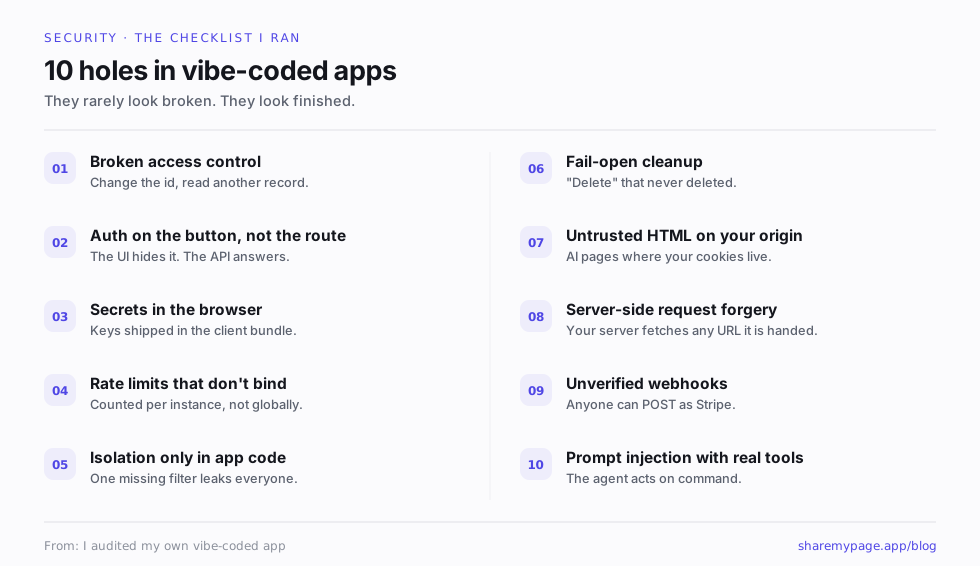
The short version, and the part I did not expect: almost none of the real problems looked like problems. The broken things looked broken, and I had mostly fixed those already. The dangerous things looked finished. That turned out to be the whole lesson, but the specifics are where it earns its keep.
The check I was most sure I would pass
Broken access control sits at the top of every one of these lists, and it is the one I felt smug about. Access is the core of the product. Every page has a visibility, private or workspace or invited or password or fully public, and every read is decided on the server, never trusted from the browser. I had tested it to death.
Then I remembered there are two front doors, not one.
ShareMyPage can be driven by a person in a browser, or by an AI agent over a connector, doing the same things: fetching a page, reading its comments, exporting it. The browser door checked visibility correctly. The connector door checked that you belonged to the workspace, and stopped there. So a member of a company workspace could ask an agent to pull a colleague's private page by its id, and the server would hand it over, because it had confirmed the workspace and forgotten to confirm the visibility.
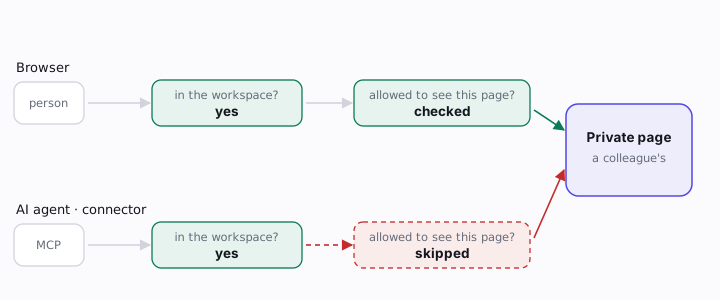
Nobody exploited it, and isolation between different companies was never in question. But it is a textbook broken-access-control bug, and it survived precisely because the code looked right. It mirrored the shape of the working browser path. It just quietly asked one fewer question than that path did. The fix was to give both doors a single shared check to call, so "can this person read this page" now has exactly one answer, computed in exactly one place.
The lesson I kept: duplicated access logic is where these bugs live. Not because anyone was careless, but because the second copy looks like the first and does a little less, and looking-like is enough to pass a review.
The rate limit that did nothing
The list said: make sure you rate limit expensive endpoints. I did rate limit them. There was a cap on the AI features, ten calls a minute, sitting right there in the code. It had passed every review, including mine.
It also did almost nothing. The limiter counted calls in a variable in memory. On a serverless platform there is no single place called "in memory." Each request can land on a fresh instance with its own copy of the counter, starting again at zero. So the real limit was ten per minute per instance, and the platform will happily hand you a lot of instances when it gets busy. It read like a rate limit and enforced a fraction of one exactly when load made it matter.
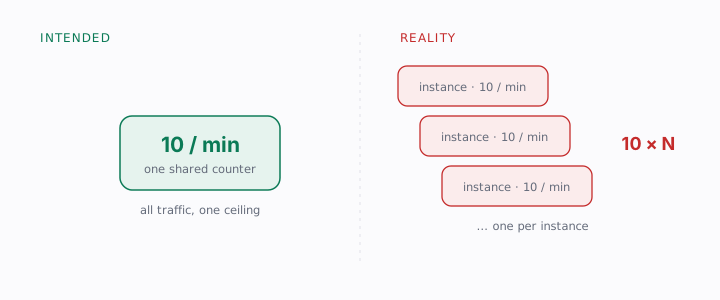
The fix was to move the counter into shared storage that every instance talks to, so ten means ten across all of them, and to make it fail closed: if that storage is unreachable, the request is denied rather than waved through, not the other way around.
Deletion that trusted the wrong value
When you delete a page, I delete the files behind it from storage. Simple, except one of those files is the logo, stored as a plain link in a column. That column can hold any public link, including one pointing at a file another page still uses, or a file that was never mine to touch. And the delete-a-file call fails open: ask it to remove something you do not own and it shrugs and reports success.
Put those together and a naive "delete everything this page points at" can either reach for an object it has no business deleting or leave real orphans behind, reporting success either way. The fix was to stop trusting the link and prove ownership from the storage key itself: an object is only removed if its key sits under the prefix this workspace owns. It is the kind of check that is easy to skip, because nothing visibly breaks when you skip it. The damage is quiet: orphaned files and the occasional object you had no right to touch, none of it throwing an error to warn you.
The hole that was a missing wall, not a bug
Not every gap is a bug. Some are a missing wall.
The sharpest question I got during all this was plain: what stops an employee from taking an internal page and setting it to "anyone with the link"? At the time, honestly, nothing at the company level. Each person controlled the visibility of their own pages, full stop. For someone hosting an HR memo or an unreleased plan, "trust every colleague individually, forever" is not a real answer.
So I built the wall. An admin can switch on a workspace setting that blocks public and password links entirely, enforced on the server where pages are created and changed, not merely greyed out in the interface where a determined person routes around it. And because turning it on does not retroactively unpublish what is already public, the setting ships with a live count of how many pages and decks are currently reachable by a link, so an admin sees the real exposure and can clear it before relying on the policy.
The audit did not find a broken thing here. It found an absent thing, which is harder to notice precisely because a missing feature never throws an error to trip over.
The control I assumed I could add, that would have enforced nothing
The lists love to recommend row-level security: isolation enforced by the database itself, so that even if your application code has a bug, the database refuses to hand one tenant another tenant's rows. It is genuinely good advice, a real second wall. My app does its isolation in application code today, not in the database, so I went to scope out adding that second layer.
The first thing I did was check the single assumption the whole plan rests on: that I could switch row-level security on and the database would actually enforce it. The answer was no, and finding out why was the most educational hour of the week.
The app connects to its database as the owner role, and in Postgres the owner bypasses row-level security by default. I could have written every policy, run the migration, watched the tests go green, and shipped a control that enforced nothing, because the very connection running the queries is exempt from it. Doing it properly means running queries as a separate, lesser role that owns nothing and holds no bypass, a real change to how the app talks to its database, not a checkbox.
So I have not shipped it. What I have instead is an honest, costed plan and the knowledge that the naive version would have been security theater with a passing test suite, which is a worse place to be than simply not having the feature.
The ones I actually passed
It was not all self-flagellation. The lists warn about running untrusted JavaScript, and that is the whole product, so I had already put real weight there: every hosted page runs in a locked-down sandbox on a separate origin, with no cookies and no reach into the app around it. I wrote that one up on its own, in Is It Safe to Host HTML That Runs Its Own JavaScript?.
They warn about server-side request forgery, and that path revalidates every redirect hop against an allowlist rather than trusting the first URL it is handed. They warn about secrets leaking into the browser bundle, and there are none there; the checks that matter run on the server. Incoming webhooks verify their signatures before anyone believes them.
None of that is a brag. It is the baseline. The only point worth making is that "vibecoded" does not have to mean "skipped the baseline."
What I am still honest about not having
And there are things I do not have, which I would rather say out loud than let you find. My tenant isolation lives in application code, not the database, as above. I do not hold my own SOC 2, though the services underneath me do. There is no self-serve audit-log export yet: you ask, I send it.
I keep a single page that states these plainly. In the middle of this audit I went back through my own security docs and pulled out every "coming soon" and "on the roadmap," because a dated promise you have not kept is just a nicer-looking lie, and a security page is the last place it belongs. If something is not built, it now says so, and it says "available on request" instead of inventing a timeline. That page is the security review, and it is deliberately the least flattering thing I have written about the product.
The pattern
The exercise left me thinking the "vibecoded apps are insecure" genre is both right and lazy.
The holes that survive are not the ones that look broken. A broken thing gets caught on the first read and fixed by lunch. The access check that mirrors a working one but asks one fewer question, the rate limit that counts in the wrong place, the isolation control the database silently ignores: every one of those passed review, passed tests, and looked done. AI is very good at producing code that looks done, and that is exactly the problem. It rarely writes code that is obviously wrong. It writes code that is plausible, which is what a real security bug hides behind.
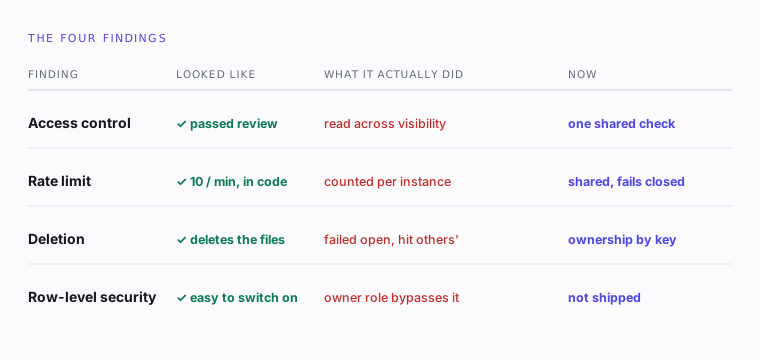
So the fix is not to write less software with AI. It is to review it like an adversary whose first assumption is that "looks finished" is where the bug is hiding, and to test the property you actually care about rather than the happy path that merely looks like coverage. I ran the checklist against my own app expecting to close it feeling smug. I found four real things instead, and every single one of them looked finished.
These days, when something in this codebase looks obviously done, that is the part I read twice.
If you want to see what all of this is protecting, ShareMyPage hosts the pages and decks you build with AI behind real access control, and you can create and edit them straight from your own AI tools over an MCP connector. The full, deliberately unflattering security write-up lives on the security review.
The full findings, still updated.
Every control this audit checked, plus the known gaps I have not closed, live in one page rather than in a post that ages.